What if the used car you want to buy has a hidden history that the seller has not mentioned? It might have been involved in an accident, declared a salvage vehicle, or advertised with specifications that do not match its actual identity. These possibilities make a free VIN lookup an important part of researching a vehicle before purchase. Rather than relying entirely on photographs, descriptions, or a seller's assurances, you can use the vehicle's unique identification number to retrieve available information and investigate potential red flags.
The risks are worth taking seriously. The Federal Trade Commission (FTC) recommends obtaining a vehicle history report before buying a used car because it may reveal previous ownership, accident history, repair records, or salvage status. The FTC also stresses that a history report cannot replace an independent vehicle inspection. Meanwhile, the NICB warns that criminals sometimes clone legitimate VINs to disguise stolen vehicles, highlighting why you should compare the VIN on the vehicle with its ownership documents and investigate inconsistencies.
The good news is that you can begin your research online before making a financial commitment. With the AFRIKARS VIN Decoder, you can start checking a vehicle's identifying information and use the results to guide your next steps. This article walks you through how a free VIN lookup works, the information you can discover, the limitations of free checks, and the additional steps you should take before buying a used car.
A Vehicle Identification Number (VIN) is a unique code assigned to a vehicle. Most modern vehicles have a 17-character VIN containing letters and numbers that identify specific details about the vehicle. You can use this code to access available vehicle information and investigate its history.
Similarly, a free VIN lookup is an online service that allows you to enter a vehicle's VIN and retrieve certain information without paying for that particular search. However, the information available varies by service. Some VIN lookup tools decode basic vehicle specifications, while others check selected records relating to theft, salvage status, or recalls.
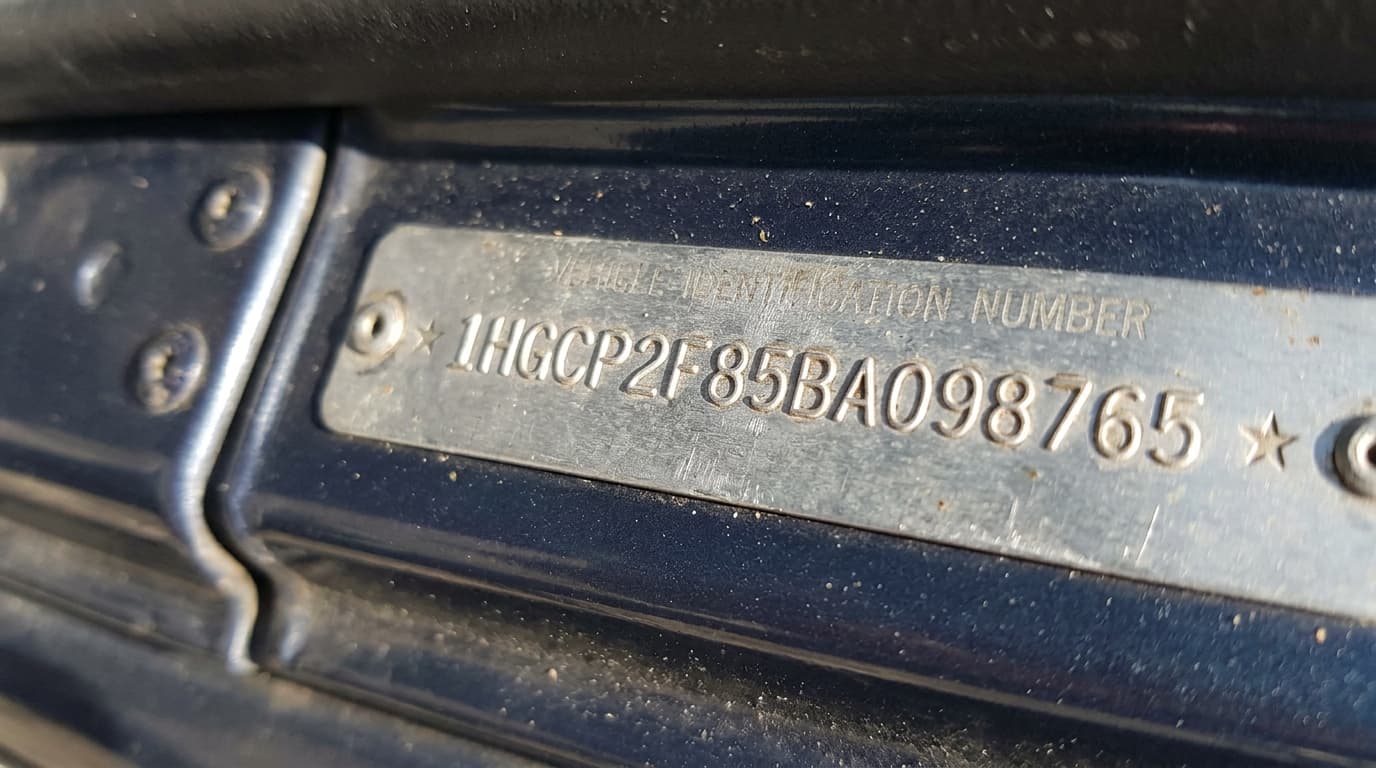
A free VIN lookup works by using a vehicle's unique Vehicle Identification Number to retrieve basic information from a vehicle database. A VIN typically contains 17 characters and can usually be found on the dashboard near the windscreen, inside the driver's door frame, or on the vehicle's documents.
A lookup is done by entering the VIN into an online VIN decoder and submitting it for verification. The system checks the number against available manufacturer or vehicle databases to identify details such as the vehicle's make, model, model year, engine specifications, and manufacturing plant.
Also Read: Car Dealers in Nigeria | How to Find a Trusted Dealer
Checking a vehicle's Vehicle Identification Number (VIN) before purchasing it is an important step in protecting yourself from fraud, unexpected repair expenses, and potentially unsafe vehicles.
Here are the key benefits of checking a vehicle's VIN before purchasing it:
- Verify Vehicle Identity: Confirm the vehicle's make, model, model year, and other identifying details.
- Identify Accident History: Opportunity to check available records for reported accidents and previous damage.
- Check Theft and Salvage Records: Opportunity to identify potential theft reports or salvage history that could create legal or financial problems.
- Detect Mileage Discrepancies: Compare available mileage records to identify possible odometer fraud.
- Uncover Flood Damage: Investigate available records for previous flood damage that could cause hidden mechanical or electrical problems.
- Estimate Maintenance Costs: Research the vehicle's specifications, potential repair needs, and spare parts availability.
- Check Safety Recalls: Identify applicable safety recalls that may require repairs.
- Avoid Costly Mistakes: You can use the information to ask informed questions, negotiate the price, or reconsider a questionable purchase.
The information depends on the tool you use. A VIN decoder may provide basic vehicle specifications, while a vehicle history lookup may reveal selected records.
| Information | What it can help you establish |
|---|---|
| Make and model | Whether the vehicle matches the seller's description. |
| Model year | The vehicle's reported model year. |
| Engine and body specifications | Certain technical details about the vehicle. |
| Theft records | Whether the vehicle appears in the database searched by the service. |
| Salvage records | Whether participating sources report a salvage designation. |
| Flood damage records | Whether available records indicate reported flood damage. |
| Recall information | Whether the vehicle may be affected by a safety recall, depending on the tool. |
| Odometer records | Whether mileage information is available for comparison. |
Remember: A clean VIN lookup does not guarantee that a car is accident-free, mechanically sound, or safe to buy. Use the results alongside a vehicle history report, available maintenance records, and a professional inspection where possible.
Also Read: Car Dealers in Nigeria | How to Find a Trusted Dealer
Checking a car's Vehicle Identification Number (VIN) before purchasing it can help you verify its identity, investigate its history, and identify potential red flags. If you're buying a used car from the US, taking a few minutes to perform a VIN check can help you avoid costly mistakes.
Here is a step-by-step guide to help you get started:
Start by obtaining the vehicle's 17-character VIN from the seller. You can usually find it on the lower-left corner of the dashboard near the windscreen, inside the driver's door frame, or on the vehicle's registration documents. If you're buying online, ask the seller to provide the VIN before making any payment.
Compare the VIN provided by the seller with the number displayed on the vehicle and its available documents. Check every character carefully to ensure they match. If you notice inconsistencies, altered identification plates, or suspicious documentation, investigate further before proceeding with the purchase.
Once you have the VIN, visit the AFRIKARS VIN Decoder to begin checking the vehicle's details. Enter the vehicle's VIN into the designated search field on the AFRIKARS VIN Decoder page and submit your request. Ensure you enter all 17 characters correctly to avoid errors. The decoder will process the VIN and return the vehicle information available through the service.
Examine the results to understand the vehicle's identifying details, such as its make, model, model year, and other available specifications. Compare these details with the seller's description and the information on the vehicle's documents. If you notice inconsistencies, ask the seller for clarification before proceeding.
Use the information obtained from the AFRIKARS VIN Decoder as part of your vehicle verification process. If you identify discrepancies in the vehicle's specifications or suspect that the seller has misrepresented the car, investigate further. You may need additional vehicle history records to establish whether the car has reported accident damage, theft records, salvage history, or mileage discrepancies. The information available depends on the records and services you consult.
Even if the VIN report looks clean, arrange for a qualified mechanic to inspect the vehicle before completing your purchase. The inspection can help identify mechanical faults, hidden accident damage, and other problems that a VIN lookup may not reveal. This is particularly important when purchasing a used car remotely from an overseas seller.
Also Read: American Car Dealers in USA | How to Buy Cars for Export
Here are some of the details you may find when you check a vehicle's VIN online.
- Vehicle Specifications: A VIN decoder can reveal basic details such as the vehicle's manufacturer, model, model year, engine information, and manufacturing plant, depending on the data available.
- Reported Theft Records: Some free VIN lookup services check whether a vehicle has been reported stolen and remains unrecovered in their databases.
- Salvage and Flood-Damage Records: A free VIN check may reveal whether participating insurance companies have reported a vehicle as salvage or flood-damaged.
- Vehicle Title Information: Depending on the service, you may be able to identify certain title-related issues. These may include reported salvage designations or other available records.
- Odometer and Mileage Records: Some vehicle-history services provide recorded odometer readings from previous inspections, registrations, or other reported events.
- Recall Information: A VIN can also help you investigate whether a vehicle has outstanding safety recalls.
If you want to check a car before buying it, start with a VIN lookup service that helps you access relevant vehicle information. The right option depends on what you want to verify, whether you are checking basic specifications or investigating a vehicle's history before making a purchase.
For buyers exploring used cars from the USA, AFRIKARS provides a VIN Decoder service that helps you investigate a vehicle before purchasing it. This can be particularly useful when you are buying remotely and cannot easily inspect the car yourself.
Follow these steps to check a vehicle's history through AFRIKARS:
- Obtain the VIN: Ask the seller for the vehicle's identification number or retrieve it from the listing if it is available.
- Open AFRIKARS: Visit the official AFRIKARS website to access its vehicle-buying services.
- Request a VIN check: Follow the available instructions to obtain a report for the vehicle you want to investigate.
- Review the available information: Examine the report and look for details that may affect your decision to buy.
- Investigate any concerns: If you identify inconsistencies or potential problems, request additional documentation or an independent inspection before proceeding.
Planning to buy a car from the USA? Use the AFRIKARS VIN Decoder service to investigate the vehicle before purchasing it. You can also explore available vehicles and review the platform's buying process on the AFRIKARS website.
A free VIN lookup can be reliable for the specific information it retrieves, but you should not treat it as a guarantee that a vehicle has a clean history or is mechanically sound.
The reliability of a VIN check depends on the service, the databases it searches, and the accuracy of the available records. Some tools provide manufacturer-reported specifications, while others search selected insurance or theft records. Understanding these differences can help you use a free VIN lookup effectively when buying a used car.
Typically, free VIN lookup may not have all the required information. Below are some of the limitations of a free VIN lookup:
- It may not include every accident: Some accidents are never reported to insurers or included in the databases searched by VIN lookup services. A vehicle may therefore have previous accident damage even when the report shows no accident records.
- It may not reveal every title problem: A basic VIN decoder does not provide a complete title history. Even a service that checks selected title-related records may not contain every relevant record. Always examine the vehicle's title documents and investigate discrepancies before purchasing.
- It may not detect odometer fraud: A free VIN lookup can only help identify mileage inconsistencies when relevant records are available. If the database contains no previous odometer readings, the service may not detect an altered mileage reading. Compare available records and consider an independent inspection.
- It cannot establish the vehicle's mechanical condition: A VIN check cannot tell you everything about the engine, transmission, brakes, suspension, or other mechanical components. A vehicle may have a clean history report and still require expensive repairs. Arrange a professional inspection where possible.
- The results depend on the database: Different services search different sources. A result from one database may not match the information available through another service.
No. A clean report means that the service did not find a relevant issue in the records it searched. It does not prove that the vehicle has never been damaged, stolen, poorly maintained, or affected by a mechanical problem. Therefore, if you are buying a car from the USA, use a VIN lookup as one part of your due diligence rather than your only check.
AFRIKARS helps customers review available vehicle information before purchasing cars from US dealers and auctions. Our published process includes vehicle-history information for marketplace listings and a VIN check for auction vehicles. Because auction vehicles are sold as is, review the available condition report carefully before authorising a purchase. You can learn more through the AFRIKARS FAQs here.
Yes. You can use free online tools such as the AFRIKARS VIN decoder to check a vehicle’s specifications. However, AFRIKARS VIN Decoder is free only after creating an account and completing the KYC onboarding requirements.
Not always. A free VIN lookup may reveal certain reported salvage or flood records, but it does not guarantee access to a vehicle’s complete accident history. For a clearer picture, review a detailed vehicle history report, inspect the car’s condition, and arrange a professional inspection where possible.
No. A clean result does not guarantee that a vehicle has never been damaged, stolen, or affected by title problems. Free databases may not contain every relevant record. Hence, verify the VIN against the vehicle and its documents, review available history reports, and arrange an inspection before making your final decision.
AFRIKARS offers VIN checks to verified customers at the point of purchase.